Mail Merge for Applicants (Or any program)

0 votes
673 views

1 Answer

answered Mar 8, 2016 by Admin
selected Mar 8, 2016 by Admin
 
Best answer

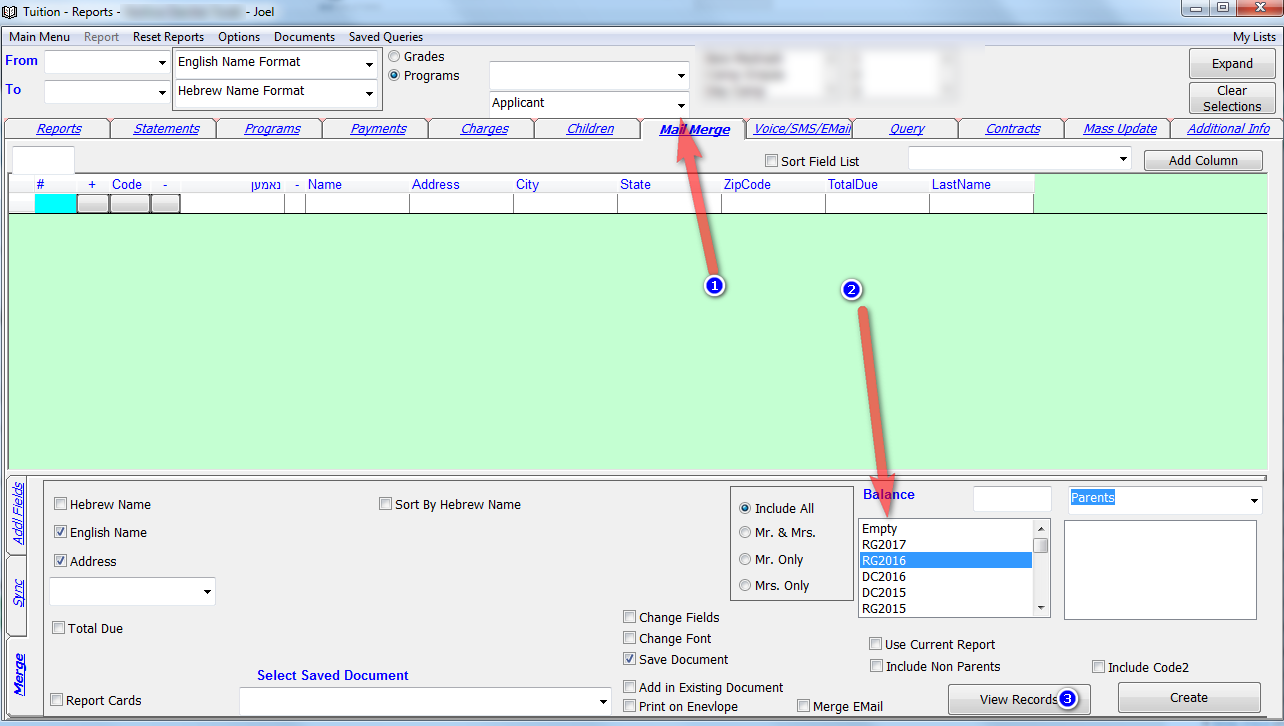
You can now choose a program from the top of the screen and the Mail Merge screen will show only Parents and Children from that program.

So lets say you want to create labels for Applicants you need to select Applicant on top and choose the period on bottom on click on view records. If your program periods are different than regular periods you will find the program periods on the bottom of the period list.



commented Jul 18, 2016 by mbs
can i get the program class in mail merge?
commented Jul 18, 2016 by Admin
You need to select the period from the bottom. Not from the top. Reread the above instructions.
commented Jul 18, 2016 by mbs
got it. Thank you!

Let's Welcome our New Members

  • Mrs. Silberstein of Bais Brocho High School - Dec 07, 2025

  • berger1 of talmud Torah Ohr Moshe - Dec 05, 2025

  • Yosef96 of Mill Basin Yeshiva - Dec 04, 2025

  • mindywind of Bais Leah High School - Dec 04, 2025

  • DS of Ner Yisroel - Dec 04, 2025

  • MordechaiAharonbayev of Yeshiva Ohr Yitzchok - Dec 03, 2025

  • ycohen of Imras Bais Yaakov - Dec 01, 2025

  • Engelberg of Yeshiva Imrei Chaim Viznitz - Dec 01, 2025

  • saulkatz of the cheder - Nov 28, 2025

...